Loading...

Loading...
As distributed AI training scales, the gap between raw compute and communication efficiency keeps widening. Once a cluster reaches thousands of GPUs and petaFLOP-class throughput, the limits of traditional data-transfer architectures become hard to ignore. Shuttling data between CPU memory and GPU memory burns CPU cycles and inflates communication latency, and both drag down the efficiency of the entire training job. GPUDirect RDMA (GDR) was designed to remove that bottleneck, and it has since become a core acceleration technology for high-end training clusters.
This article walks through GDR end to end: the underlying mechanism, why it fits AI training so well, how to deploy it, how to tune it, and what the results look like in practice — so your team can get the most out of a GPU cluster.
GPUDirect RDMA is a high-speed data-transfer technology from NVIDIA. The idea is simple: let network adapters talk directly to GPU memory (or to other GPUs) and skip CPU forwarding entirely. With hardware-level protocol support, the NIC accesses GPU memory directly, the CPU drops out of the transfer path, and you get lower latency and higher effective bandwidth.
Without GDR, cross-node GPU communication — or any data exchange between GPUs and storage — has to relay through CPU memory:
GPU memory → PCIe → CPU memory → NIC → network → remote NIC → remote CPU memory → remote PCIe → remote GPU memory
That path has two costly problems:
GDR enables direct GPU-memory-to-NIC communication through three components working together: GPUDirect, RDMA (Remote Direct Memory Access), and the PCIe ATU (Address Translation Unit). The path collapses to:
GPU memory → PCIe → NIC → network → remote NIC → remote GPU memory
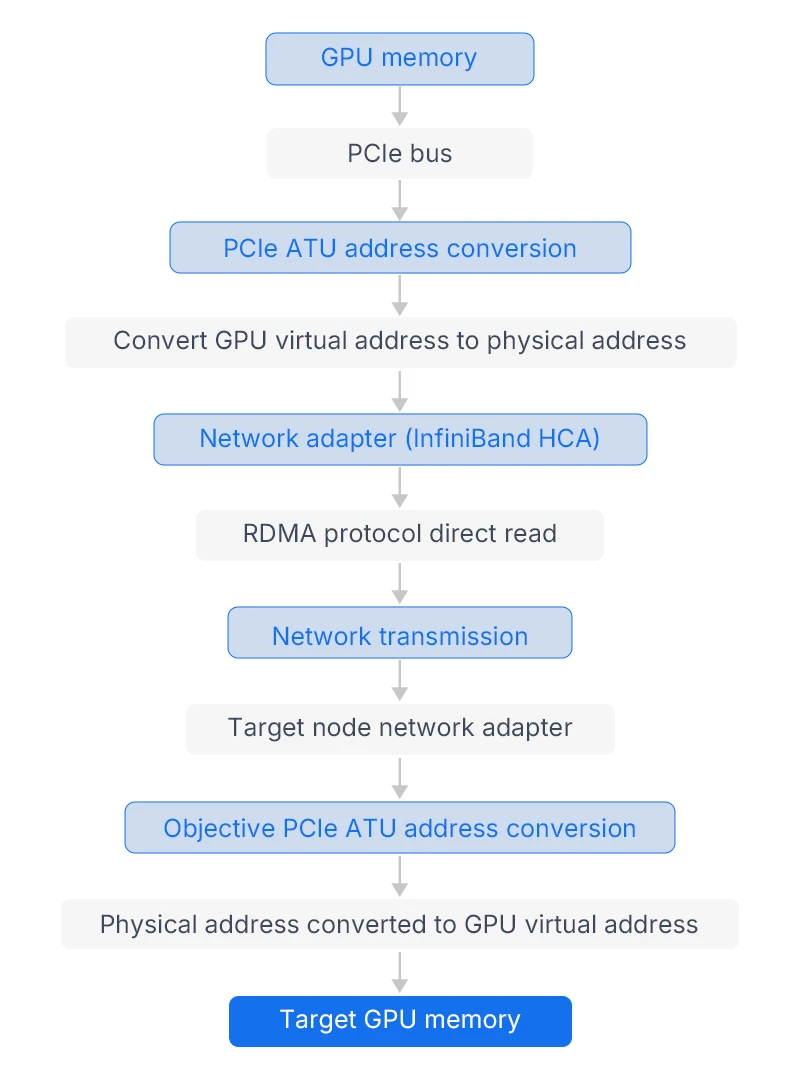
(Figure 1: GDR data path — red is the sending GPU, blue is the receiving GPU. CPU memory is bypassed.)
Three things make it work:
AI training is defined by large data volumes, frequent communication, and sensitivity to latency. GDR maps cleanly onto all three:
The defining requirement of AI training is efficient multi-GPU collaboration. GDR's job is to speed up communication between GPUs — within a node and across nodes — and to accelerate data movement between GPUs and storage. In practice, the wins concentrate in four scenarios that span the full pipeline from data loading to model training.
As large models like Llama and the GPT series have grown, a single node's GPUs are no longer enough, and multi-node clusters have become standard. That makes cross-node gradient sync and parameter updates the key efficiency bottleneck — and GDR is the main answer.
Here, GDR works hand-in-hand with NCCL to let GPUs across nodes communicate directly. Take a 64-GPU GPT-3 cluster (8 nodes × 8 GPUs). In the traditional model, each GPU's gradients first land in local CPU memory, then go out over the network — high latency plus CPU strain. With GDR enabled, GPUs push gradients straight into remote GPU memory over InfiniBand, no CPU in the middle.
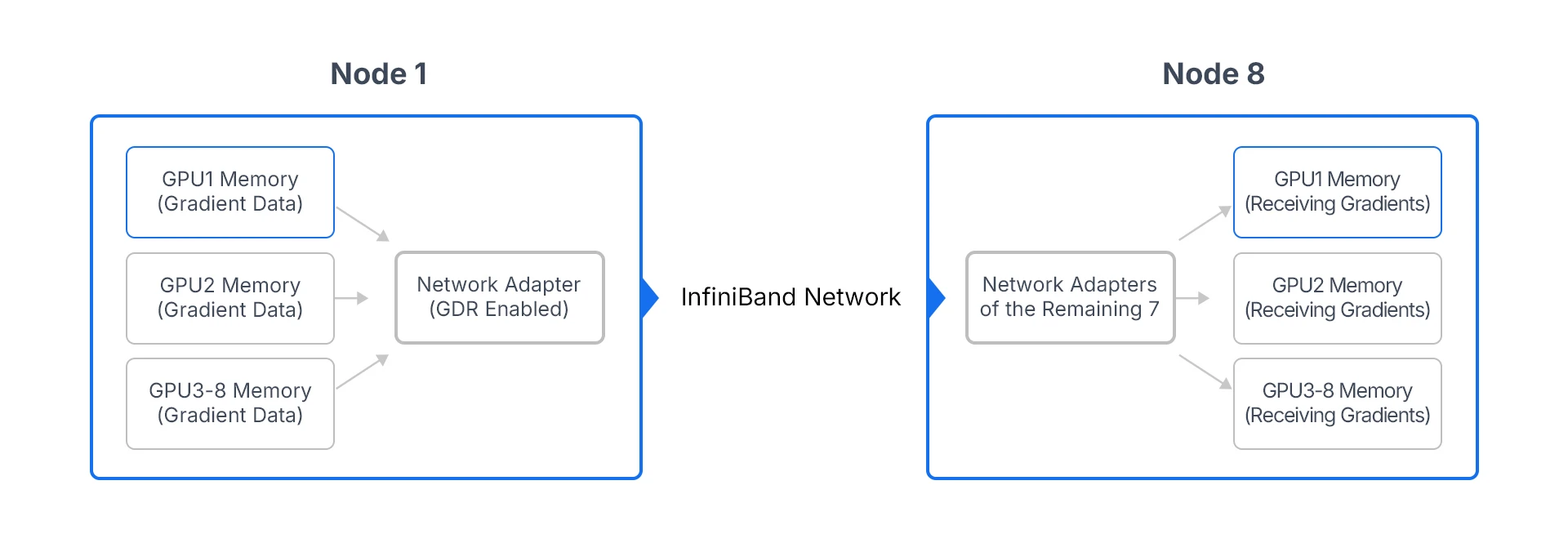
(Figure 2: GDR in multi-node training — direct cross-node gradient synchronization.)
The payoff:
GDR matters even inside a single node, especially with high-end GPUs like the A100 and H100. Traditional intra-node communication runs over PCIe, which is bandwidth-limited (PCIe 4.0 x16 is about 32 GB/s), and with eight GPUs talking at once you hit a wall. Pairing NVLink with InfiniBand or RoCE lets GDR deliver high-speed communication among GPUs in the same box.
Training runs chew through petabytes of data. Traditionally, loading from storage into GPU memory relays through CPU memory (storage → CPU memory → GPU memory), which adds latency and CPU load and can make data loading the bottleneck.
GDR lets GPUs and storage exchange data directly, shortening the path to storage → NIC → GPU memory:
2. Single-node Multi-GPU Training (High-bandwidth Communication Scenario)
Even in the scenario of single-node multi-GPU training, GDR technology can play an important role — especially for high-end GPUs such as A100 and H100. Traditional single-node multi-GPU communication relies on the PCIe bus, which has limited bandwidth (the bandwidth of PCIe 4.0 x16 is 32GB/s). When 8 GPUs communicate simultaneously, a bandwidth bottleneck will occur. In contrast, GDR technology can combine NVLink with InfiniBand (or RoCE) to achieve high-speed communication among GPUs within a single node.
Training runs chew through petabytes of data. Traditionally, loading from storage into GPU memory relays through CPU memory (storage → CPU memory → GPU memory), which adds latency and CPU load and can make data loading the bottleneck.
GDR lets GPUs and storage exchange data directly, shortening the path to storage → NIC → GPU memory:
4.Hybrid model + data parallelism
For TB-parameter models like GPT-4, pure data parallelism isn't enough, and you need a hybrid of model and data parallelism. GDR optimizes both at once: low-latency gradient sync on the data-parallel side, high-bandwidth shard-parameter transfer on the model-parallel side. On a 1,024-GPU GPT-4 run, enabling GDR cut model-shard transfer latency by 60% and shortened the training cycle by more than 40%.
GDR has specific hardware and software prerequisites, and it has to be configured alongside NCCL and CUDA to perform. Below are the prerequisites, the configuration steps, and the gotchas worth knowing before you start.
Hardware
Software
The two core tasks are enabling GPUDirect RDMA and setting NCCL environment variables so GDR and NCCL work together.
(1) Check the environment and install dependencies
bash
# Check whether the GPU supports GPUDirect
nvidia-smi --query-gpu=gpu_name,gpu_bus_id,driver_version --format=csv,noheader,nounits
# Check whether the NIC supports RDMA
ibstat # InfiniBand info in the output means RDMA is available
# Install dependencies (Ubuntu)
sudo apt-get install -y cuda-toolkit-11-8 nccl-toolkit libibverbs-dev ibutils
# Install the Mellanox OFED driver (InfiniBand adapter)
sudo ./mlnxofedinstall --add-kernel-support
(2) Enable GDR
Enable GPU Direct RDMA by modifying the NVIDIA driver configuration file:
bash# Check whether the GPU supports GPUDirect
# Add the following content (Enable GPU Direct RDMA)
options nvidia_uvm uvm_perf_prefetch_enable=1 uvm_enable_peer_memory_access=1
options nvidia NVreg_EnablePCIeRdma=1
# Reload Driver
sudo rmmod nvidia_uvm nvidia
sudo modprobe nvidia_uvm nvidia
# Verify whether GDR is enabled
nvidia-smi -q | grep "GPU Direct RDMA" # If Enabled is displayed, it means the activation is successful
(3) Set NCCL environment variables (the key step)
NCCL needs to be configured via environment variables to specify the use of GDR technology and ensure that GDR transmission is enabled for cross-node GPU communication:
bash# Add the following environment variables to the training script (or write them to /etc/profile)
export NCCL_NET_GDR=1 # Enable GDR Technology
export NCCL_IB_DISABLE=0 # Enable InfiniBand
export NCCL_SOCKET_IFNAME=ib0 # Specify InfiniBand Network Card
export NCCL_IB_HCA=mlx5_0 # Specify InfiniBand HCA Device (View via ibstat)export NCCL_DEBUG=INFO # Enable NCCL Debug Logs (Optional)
(4) Verify performance
Use the official NCCL testing tool nccl-tests to verify the transmission performance of GDR technology, and compare the differences in bandwidth and latency with GDR enabled and disabled respectively:
bash# Clone and compile nccl-tests (download manually if the link parsing fails)
git clone https://github.com/NVIDIA/nccl-tests.git
cd nccl-tests
make MPI=1 MPI_HOME=/usr/local/openmpi CUDA_HOME=/usr/local/cuda
# Enable GDR Test (2 Nodes × 8GPU, AllReduce Test)
mpirun -np 16 -N 8 -H node1:8,node2:8 \
-x NCCL_NET_GDR=1 -x NCCL_IB_DISABLE=0 \
./build/all_reduce_perf -b 256M -e 8G -f 2 -g 1
# Disable GDR Test (Comparison)
mpirun -np 16 -N 8 -H node1:8,node2:8 \
-x NCCL_NET_GDR=0 -x NCCL_IB_DISABLE=0 \
./build/all_reduce_perf -b 256M -e 8G -f 2 -g 1
Pass criteria: with GDR on, if BusBW rises by more than 30% and latency drops by more than 50%, the configuration is working.
3. Deployment Notes (Pitfall Avoidance Guide)
Turning GDR on isn't the whole job. You'll want to tune for your workload and clear common issues to get full value.
(1) Match the protocol to the message size
NCCL offers several transport protocols; pick by message size to balance latency and bandwidth:
export NCCL_PROTO=LL128 for large messages, export NCCL_PROTO=Simple for small ones.
2. Common issues
| Symptom | Likely Cause | Fix |
|---|---|---|
| GDR won't enable; log shows "GPU Direct RDMA not enabled" | GPU doesn't support GDR, bad driver config, or CUDA too old | 1. Check whether the GPU model supports GPU Direct; 2. Reconfigure the nvidia.conf file and restart the driver; 3. Upgrade CUDA to version 11.4 or higher |
| GDR on, but bandwidth barely improves | NIC bandwidth too low, poor PCIe link config, or bad NCCL env vars | 1. Check the network adapter bandwidth (required ≥100Gb/s); 2. Optimize the PCIe link configuration; 3. Confirm that NCCL_NET_GDR=1 is enabled |
| Cross-node communication fails; log shows "HCA device not found" | InfiniBand driver missing or wrong interface name | 1. Reinstall the Mellanox OFED driver; 2. Check the network card name via ibstat and modify NCCL_SOCKET_IFNAME |
| CPU usage stays high during training | GDR not actually active, preprocessing on CPU, or bad MPI config | 1. Verify whether GDR is enabled (nvidia-smi -q | grep "GPU Direct RDMA"); 2. Optimize the data preprocessing pipeline and adopt GPU acceleration; 3. Configure MPI to bind CPU cores (--bind-to core) |
Environment: 8 nodes × 8 A100 GPUs, 200 Gb/s InfiniBand (HDR), CUDA 11.8, NCCL 2.18, GDR enabled.
Workload: GPT-3 (175B parameters), data-parallel, batch size 128, 10 TB of training data.
GDR on vs. off:
• Gradient synchronization latency: reduced from 120μs to 45μs, a decrease of 62.5%.
• Single-step training time: reduced from 1.8s to 1.1s, an improvement of 38.9%.
• CPU usage: dropped from 75% to 20%, freeing up CPU resources for data preprocessing.
• Training cycle: shortened from 12 days to 7 days, with efficiency increased by 41.7%.
GDR is the communication accelerator for distributed training. By taking the CPU out of the data path, it gives GPUs, networks, and storage a direct high-speed channel and addresses the classic problems of the traditional model — high latency, heavy CPU load, and bandwidth ceilings. For large models and large clusters, GDR working alongside NCCL and InfiniBand meaningfully lifts efficiency and shortens training cycles, which is why it's become a fixture in high-end clusters.
Its appeal isn't only performance — it's also low cost to adopt. There's no training code to change; sort out the hardware and a handful of environment variables and you're running, with compatibility across mainstream frameworks. For engineers, knowing how to deploy, tune, and debug GDR is the most direct way to clear communication bottlenecks and unlock a cluster's full compute potential.
Looking ahead, as GPUs get faster and models keep growing, GDR will push toward still higher bandwidth and lower latency — riding hardware like PCIe 5.0 and 400 Gb/s InfiniBand (NDR), and integrating more deeply with AI frameworks so GDR can switch on and self-tune automatically, lowering the barrier to entry and supporting larger, more efficient training.
