Loading...

Loading...

Against the backdrop of the rapid development of distributed AI training, the contradiction between computing power improvement and communication efficiency has become increasingly prominent. When GPU computing power reaches the scale of thousands of cards and quadrillions of operations per second, the bottleneck of traditional data transmission architectures becomes more obvious. The "data migration" between CPU memory and GPU video memory not only consumes massive CPU resources but also causes a sharp surge in communication latency, dragging down the efficiency of the entire training task. The emergence of GDR (GPU Direct RDMA) technology has completely broken this dilemma and become an indispensable core acceleration technology for high-end AI training clusters. Starting from the technical principle of GDR, its adaptation value in AI training scenarios, practical deployment, performance optimization and typical cases, this paper comprehensively analyzes its application in AI training, helping developers maximize the performance of clusters.
GDR, whose full name is GPU Direct RDMA, is a high-speed data transmission technology launched by NVIDIA. Its core positioning is to "bypass CPU forwarding and realize direct data interaction between GPU memory and network devices (or other GPUs)". Essentially, through protocol optimization at the hardware level, it enables network adapters to directly access GPU memory, eliminates CPU intervention in the traditional transmission mode, and thus achieves low-latency and high-bandwidth data transmission.
1. Pain points of the traditional transmission model (highlighting the value of GDR through comparison)
In AI training scenarios without GDR technology, cross-node GPU communication or data interaction between GPUs and storage devices has to go through the cumbersome process of "CPU memory relay", with the specific path as follows:
GPU video memory → PCIe bus → CPU memory → network adapter → network → target node network adapter → target CPU memory → target PCIe bus → target GPU video memory.
This model has two fatal pain points that directly restrict the efficiency of AI training:
• High latency: Every data transmission requires "read-write relay" through CPU memory. The processing overhead of the CPU increases transmission latency. Especially in scenarios with small-batch and high-frequency communication (such as gradient synchronization), accumulated latency will significantly slow down the training speed.
• High CPU usage: The data transfer between the GPU and the network requires the full participation of the CPU, consuming a large amount of CPU computing resources and turning the CPU into a "computing power bottleneck". When the GPU is running at full computational load, the CPU may become overloaded due to data transmission tasks and fail to respond to other core tasks.
2. Core Principle and Transmission Path of GDR Technology
GDR technology enables "direct communication between GPU memory and network devices" through the collaboration of three core components, namely GPU Direct, RDMA (Remote Direct Memory Access), and PCIe ATU (Address Translation Unit). Its optimized transmission path is simplified as follows:
GPU video memory → PCIe bus → network adapter → network → target node network adapter → target GPU video memory
The core working mechanism can be broken down into three steps, which are easier to understand with the help of diagrams:
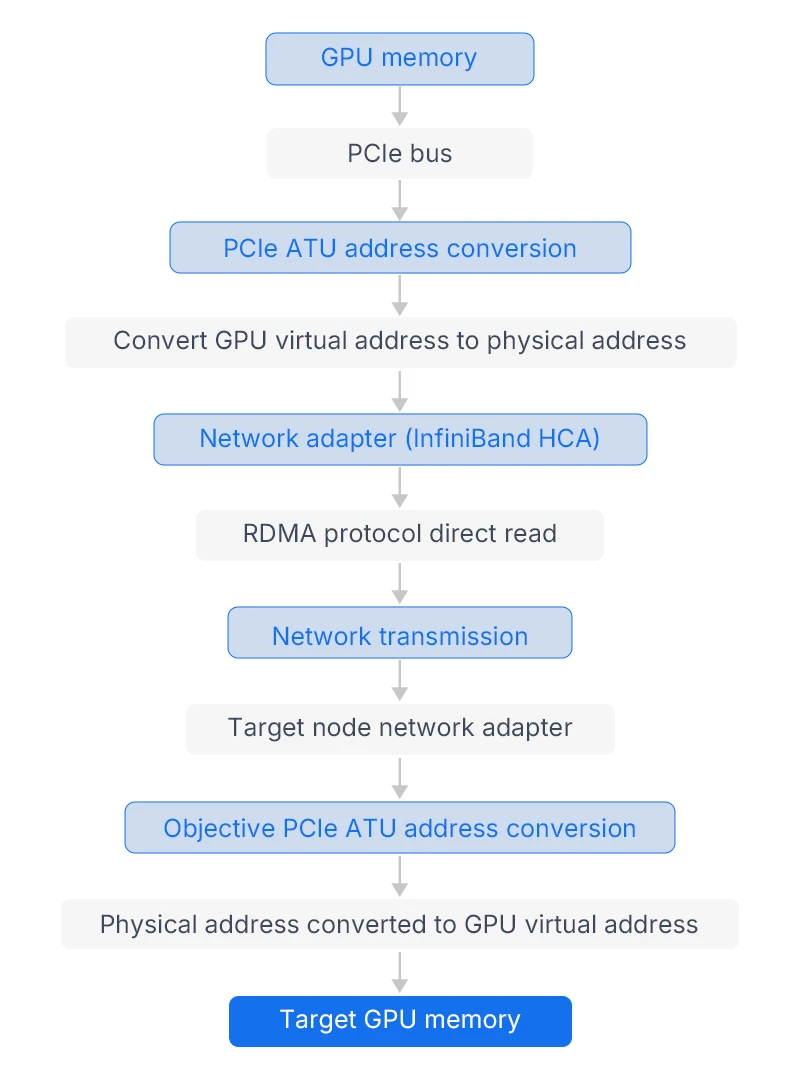
(Figure 1: Schematic diagram of GDR technology data transmission path, with red indicating the sending-end GPU and blue indicating the receiving-end GPU, bypassing CPU memory relay)
• Address Mapping: The conversion between GPU virtual addresses and physical addresses is implemented via PCIe ATU, enabling network adapters to recognize the addresses of GPU video memory without CPU involvement in address resolution.
• Direct Access: The network adapter directly reads data from (or writes data to) GPU video memory via the RDMA protocol. The entire process requires no read/write instructions initiated by the CPU and does not occupy the CPU memory buffer.
• Protocol Optimization: In-depth adaptation of GDR with high-speed network protocols such as InfiniBand and RoCE, supporting zero-copy transmission to further reduce data copy overhead and maximize bandwidth utilization.
3. Core Advantages of GDR Technology (Key Features Adapted for AI Training)
Combined with the core requirements of AI training, namely "large data volume, frequent communication, and latency sensitivity", the advantages of GDR technology can be summarized into four points, which accurately address the pain points of traditional transmission modes.
• Low Latency: Bypassing CPU relay reduces transmission latency by over 50%. The latency of small data volume communication (such as gradient synchronization) can be reduced to the microsecond level, perfectly adapting to high-frequency small-batch data interaction in distributed training.
• High Bandwidth: Eliminates the limitation of CPU memory bandwidth and fully unlocks the bandwidth potential of PCIe 4.0/5.0 and InfiniBand. The transmission bandwidth of a single link can exceed 100GB/s, supporting rapid synchronization of TB-level model parameters.
• Low CPU Usage: Data transmission does not require CPU participation, freeing up CPU resources for core tasks such as training task scheduling and data preprocessing, and preventing the CPU from becoming a performance bottleneck.
• Strong Compatibility: Deeply integrated with NVIDIA CUDA and NCCL (Collective Communications Library). It can be directly compatible with mainstream frameworks such as PyTorch and TensorFlow without modifying AI training code, featuring low deployment costs.
The core requirement of AI training scenarios lies in "efficient multi-GPU collaborative computing". The core value of GDR technology is to optimize the communication efficiency between multiple GPUs (multi-GPU within a single node and multi-GPU across multiple nodes), while accelerating the data interaction speed between GPUs and storage devices. Combined with actual training scenarios, its applications are mainly concentrated in the following four core scenarios, covering the entire process from data loading to model training.
1.Multi-node distributed training (the core application scenario)
With the popularity of large models (such as Llama and the GPT series), the computing power of single-node GPUs can no longer meet training requirements, and multi-node clusters have become the mainstream deployment method. At this point, communication tasks such as gradient synchronization and model parameter updates across node GPUs have become a key bottleneck for training efficiency — and GDR technology is the core solution to solve this problem.
In multi-node distributed training, GDR technology works in coordination with the NCCL library to enable direct communication between cross-node GPUs:Taking the cluster training of the GPT-3 model with 8 nodes × 8 GPUs (64 GPUs in total) as an example, in the traditional mode, the gradient data of each GPU needs to be first transmitted to the local CPU memory and then sent to other nodes through the network, which not only brings high latency but also causes CPU overload. After enabling GDR technology, GPUs can directly transmit gradient data to the GPU memory of other nodes via the InfiniBand network without CPU intervention. The specific process is as follows:
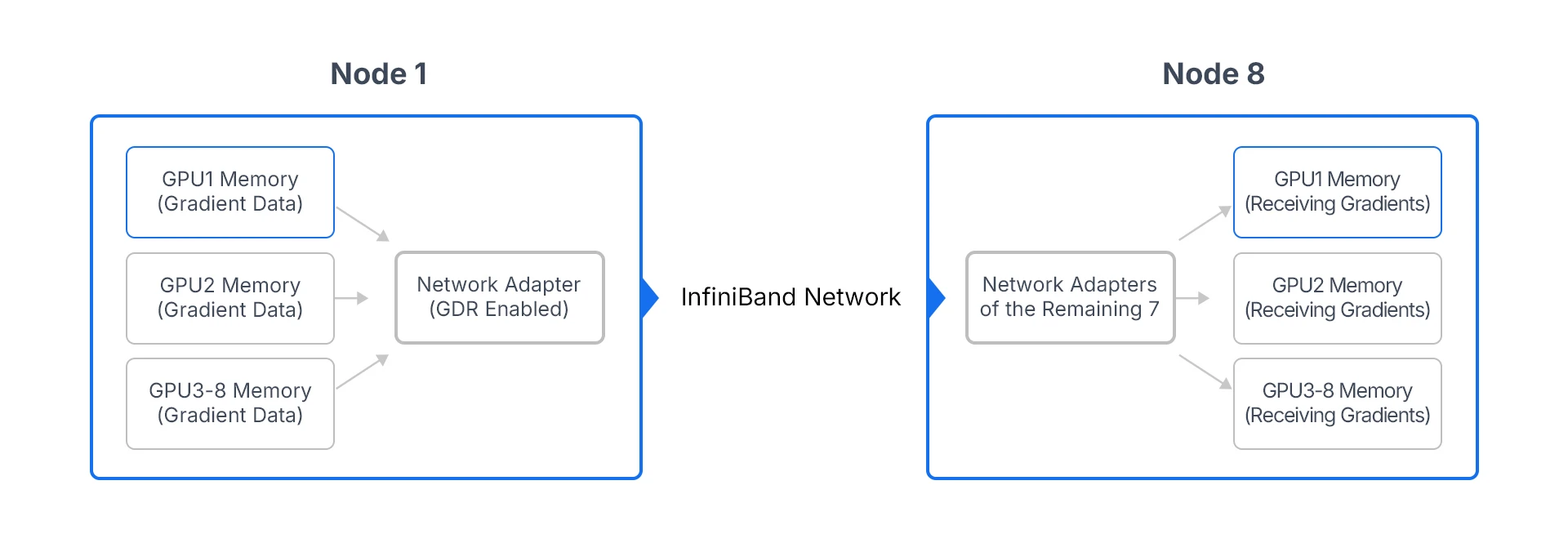
(Figure 2: Schematic diagram of the application of GDR technology in multi-node distributed training, enabling direct gradient synchronization across node GPUs)
In this scenario, the core value of GDR technology is reflected in:
• Reducing gradient synchronization latency: It cuts the cross-node gradient synchronization latency from the millisecond level to the microsecond level. Especially in large model training, the reduction of high-frequency gradient synchronization latency can cumulatively save hours or even days of training time.
• Improving cluster scalability: When the number of cluster nodes increases (e.g., expanding from 8 nodes to 32 nodes), the communication latency of the traditional mode rises linearly, while GDR technology maintains low latency performance and supports efficient collaboration of large-scale clusters.
2. Single-node Multi-GPU Training (High-bandwidth Communication Scenario)
Even in the scenario of single-node multi-GPU training, GDR technology can play an important role — especially for high-end GPUs such as A100 and H100. Traditional single-node multi-GPU communication relies on the PCIe bus, which has limited bandwidth (the bandwidth of PCIe 4.0 x16 is 32GB/s). When 8 GPUs communicate simultaneously, a bandwidth bottleneck will occur. In contrast, GDR technology can combine NVLink with InfiniBand (or RoCE) to achieve high-speed communication among GPUs within a single node.
3. Large-scale Data Loading (Interaction between GPU and Storage Devices)
AI training needs to process petabyte-level training data. In the traditional mode, when data is loaded from storage devices (such as distributed storage) into GPU video memory, it has to go through the relay path of "storage → CPU memory → GPU video memory". This not only brings high latency but also consumes a large amount of CPU resources, making data loading a bottleneck for model training.
GDR technology enables direct data interaction between GPUs and storage devices. The data loading path is simplified to "storage device → network adapter → GPU video memory" without relay through CPU memory. Its specific advantages are as follows:
• Improve data loading speed: Reduce the loading time of PB-level data by more than 30%, with particularly remarkable effects in scenarios involving large-size training data such as images and videos.
• Reduce CPU overhead: Data loading requires no CPU involvement, allowing the CPU to focus on tasks such as data preprocessing and model scheduling, and avoiding CPU overload caused by data loading.
4.Hybrid Training of Model Parallelism and Data Parallelism
For ultra-large models with TB-level parameters (such as GPT-4), pure data parallelism can no longer meet training requirements, and a hybrid training mode combining model parallelism and data parallelism is required. GDR technology can optimize the communication efficiency of both parallel modes simultaneously: in data parallelism, it achieves low-latency synchronization of gradient data; in model parallelism, it enables high-bandwidth transmission of model shard parameters, thereby supporting the efficient training of ultra-large models. For instance, when training the GPT-4 model on a cluster with 1024 GPUs, enabling GDR technology reduces the transmission latency of model shard parameters by 60% and shortens the training cycle by more than 40%.
The deployment of GDR technology needs to meet specific hardware and software requirements, and it must be configured collaboratively with components such as NCCL and CUDA to fully unleash its performance. Combined with real-world deployment scenarios, this article elaborates on the deployment prerequisites, configuration procedures, and key precautions to enable developers to implement it directly in practice.
1.Deployment Prerequisites (Hardware + Software Requirements)
(1) Hardware Requirements
• GPU: Must support NVIDIA GPU Direct technology. High-end GPUs such as A100 and H100 are recommended; entry-level GPUs (e.g., GTX series) do not support GDR.
• Network Adapter: Must support RDMA technology. InfiniBand HCA (e.g., Mellanox ConnectX-6, ConnectX-7) or RoCE-capable Ethernet adapters are recommended, with a bandwidth of no less than 100GB/s.
• Motherboard: Must support PCIe 4.0 and above, and the PCIe slots need to support the ATU address translation function to ensure unobstructed PCIe links between network adapters and GPUs.
• Cluster Architecture: Single-node multi-GPU configurations require NVLink; multi-node clusters need to deploy InfiniBand/RoCE high-speed networks to ensure sufficient network bandwidth between nodes.
(2) Software Requirements
• CUDA Toolkit: Version ≥ 11.4. GDR technology relies on the GPU Direct API of CUDA, and older CUDA versions do not support some GDR functions.
• NCCL Library: Version ≥ 2.10. As the core communication library for distributed training, NCCL is deeply integrated with GDR, and it is necessary to ensure compatibility between the NCCL version and the CUDA version.
• Operating System: Linux systems are recommended (e.g., Ubuntu 20.04, CentOS 8). Windows systems have incomplete support for GDR and are not recommended for AI training scenarios.
• Drivers: NVIDIA GPU Driver ≥ Version 470.xx; Network Adapter Driver (e.g., Mellanox OFED) ≥ Version 5.0. Ensure compatibility between hardware drivers and software components.
2. Core Configuration Steps (Taking multi-node InfiniBand cluster as an example)
The core configuration of GDR technology is to "enable GPU Direct RDMA" and configure NCCL environment variables to ensure the collaborative operation of GDR and NCCL. The specific steps are as follows (can be copied and executed directly):
(1) Environment Check and Dependency Installation
bash# Check if the GPU supports GPU Direct
nvidia-smi --query-gpu=gpu_name,gpu_bus_id,driver_version --format=csv,noheader,nounits
# Check if the network adapter supports RDMA
ibstat # If InfiniBand-related information is outputted, it indicates RDMA is supported
# Install Dependencies (Ubuntu System)
sudo apt-get install -y cuda-toolkit-11-8 nccl-toolkit libibverbs-dev ibutils
# Install Mellanox OFED Driver (InfiniBand Adapter)
sudo ./mlnxofedinstall --add-kernel-support
(2) Enable the GDR function
Enable GPU Direct RDMA by modifying the NVIDIA driver configuration file:
bash# Edit the driver configuration file
sudo vi /etc/modprobe.d/nvidia.conf
# Add the following content (Enable GPU Direct RDMA)
options nvidia_uvm uvm_perf_prefetch_enable=1 uvm_enable_peer_memory_access=1
options nvidia NVreg_EnablePCIeRdma=1
# Reload Driver
sudo rmmod nvidia_uvm nvidia
sudo modprobe nvidia_uvm nvidia
# Verify whether GDR is enabled
nvidia-smi -q | grep "GPU Direct RDMA" # If Enabled is displayed, it means the activation is successful
(3) Configure NCCL environment variables (critical step)
NCCL needs to be configured via environment variables to specify the use of GDR technology and ensure that GDR transmission is enabled for cross-node GPU communication:
bash# Add the following environment variables to the training script (or write them to /etc/profile)
export NCCL_NET_GDR=1 # Enable GDR Technology
export NCCL_IB_DISABLE=0 # Enable InfiniBand
export NCCL_SOCKET_IFNAME=ib0 # Specify InfiniBand Network Card
export NCCL_IB_HCA=mlx5_0 # Specify InfiniBand HCA Device (View via ibstat)export NCCL_DEBUG=INFO # Enable NCCL Debug Logs (Optional)
(4) Verify the performance of GDR
Use the official NCCL testing tool nccl-tests to verify the transmission performance of GDR technology, and compare the differences in bandwidth and latency with GDR enabled and disabled respectively:
bash# Clone and compile nccl-tests (download manually if the link parsing fails)
git clone https://github.com/NVIDIA/nccl-tests.git
cd nccl-tests
make MPI=1 MPI_HOME=/usr/local/openmpi CUDA_HOME=/usr/local/cuda
# Enable GDR Test (2 Nodes × 8GPU, AllReduce Test)
mpirun -np 16 -N 8 -H node1:8,node2:8 \
-x NCCL_NET_GDR=1 -x NCCL_IB_DISABLE=0 \
./build/all_reduce_perf -b 256M -e 8G -f 2 -g 1
# Disable GDR Test (Comparison)
mpirun -np 16 -N 8 -H node1:8,node2:8 \
-x NCCL_NET_GDR=0 -x NCCL_IB_DISABLE=0 \
./build/all_reduce_perf -b 256M -e 8G -f 2 -g 1
Verification Standard: After enabling GDR, if BusBW (Bus Bandwidth) increases by more than 30% and Latency decreases by more than 50%, the GDR configuration is deemed successful.
3. Deployment Notes (Pitfall Avoidance Guide)
• Version Compatibility: Ensure the versions of CUDA, NCCL, GPU drivers and network adapter drivers are compatible; otherwise, GDR may fail to be enabled or suffer abnormal performance (e.g., CUDA 11.8 requires NCCL 2.18 or higher).
• Network Configuration: Set a proper MTU (2048 recommended) for InfiniBand networks to avoid increased latency caused by network fragmentation; ensure network connectivity among nodes in multi-node clusters and disable firewalls.
• GPU Memory Configuration: GDR technology requires GPU video memory to support peer-to-peer access. Make sure there is sufficient GPU video memory to prevent data transmission failures due to insufficient video memory.
• Debugging Tips: If GDR fails to be enabled, check logs by setting NCCL_DEBUG=INFO. Focus on troubleshooting errors such as "GPU Direct RDMA not enabled" and "HCA device not found", and verify driver configurations and hardware connections accordingly.
In AI training scenarios, simply enabling GDR technology is not sufficient. It is necessary to conduct targeted performance optimization based on the characteristics of training tasks, and timely troubleshoot common issues to maximize the value of GDR.
1. Core Performance Optimization Strategy
(1) Adjust the transmission protocol according to the data volume
GDR technology supports various transmission protocols, which need to be adjusted according to the volume of training data to balance bandwidth and latency:
• Small data volume (<64KB, e.g., gradient synchronization): Enable the Simple protocol of NCCL to reduce protocol overhead and further lower latency.
• Large data volume (>1MB, e.g., model parameter synchronization): Enable the LL128 protocol of NCCL, adopt a 128-byte transmission unit to maximize bandwidth utilization.
Configuration commands: export NCCL_PROTO=LL128 (for large data volume), export NCCL_PROTO=Simple (for small data volume).
(2) Optimize with the NCCL algorithm
The collaboration between GDR technology and NCCL algorithms such as Ring AllReduce and Tree can further improve communication efficiency:
• Multi-node large-scale cluster (>32 GPUs): Enable the Ring AllReduce algorithm. The bandwidth scales linearly with the number of GPUs. Combined with GDR technology, bottleneck-free communication can be achieved.
• Single-node small-scale cluster (2-8 GPUs): Enable the Tree algorithm with lower latency, suitable for small-batch data training scenarios.
2. Troubleshooting of Common Issues (High-frequency Scenarios)
| Problem Phenomenon | Possible Causes | Troubleshooting Method |
|---|---|---|
| Failed to enable GDR, and the log shows "GPU Direct RDMA not enabled" | GPU does not support GDR, incorrect driver configuration, and the CUDA version is too low | 1. Check whether the GPU model supports GPU Direct; 2. Reconfigure the nvidia.conf file and restart the driver; 3. Upgrade CUDA to version 11.4 or higher |
| After enabling GDR, there is no significant improvement in bandwidth. | Insufficient bandwidth of the network adapter, improper PCIe link configuration, and incorrect configuration of NCCL environment variables | 1. Check the network adapter bandwidth (required ≥100GB/s); 2. Optimize the PCIe link configuration; 3. Confirm that NCCL_NET_GDR=1 is enabled |
| Cross-node communication failed, with the log showing "HCA device not found" | InfiniBand driver not installed and network card name configured incorrectly | 1. Reinstall the Mellanox OFED driver; 2. Check the network card name via ibstat and modify NCCL_SOCKET_IFNAME |
| CPU usage remains excessively high during training | GDR not truly enabled, data preprocessing occupying CPU, improper MPI configuration | 1. Verify whether GDR is enabled (nvidia-smi -q | grep "GPU Direct RDMA"); 2. Optimize the data preprocessing pipeline and adopt GPU acceleration; 3. Configure MPI to bind CPU cores (--bind-to core) |
To more intuitively reflect the value of GDR technology in AI training, typical cases are combined below to demonstrate its practical application effects for developers' reference.
Case: Multi-node training of GPT-3 model (64-GPU cluster)
Deployment Environment: 8 nodes × 8 GPUs (A100), InfiniBand 200GB/s network, CUDA 11.8, NCCL 2.18, with GDR technology enabled.
Training Task: GPT-3 (175 billion parameters) data parallel training, batch size 128, training data volume 10TB.
Application Effect Comparison (GDR Enabled vs Disabled):
• Gradient synchronization latency: reduced from 120μs to 45μs, a decrease of 62.5%.
• Single-step training time: reduced from 1.8s to 1.1s, an improvement of 38.9%.
• CPU usage: dropped from 75% to 20%, freeing up CPU resources for data preprocessing.
• Training cycle: shortened from 12 days to 7 days, with efficiency increased by 41.7%.
As a "communication accelerator" for AI distributed training, GDR technology delivers core value by breaking through CPU-mediated transmission barriers. It enables direct high-speed communication between GPUs, networks and storage devices, perfectly addressing the pain points of traditional transmission modes such as high latency, high CPU occupancy and insufficient bandwidth. In scenarios involving large models and large-scale cluster training, GDR technology works in synergy with components like NCCL and InfiniBand to significantly boost training efficiency and shorten training cycles, making it an indispensable technology for high-end AI training clusters.
From a practical application perspective, the advantages of GDR technology lie not only in "performance improvement" but also in "low deployment costs". There is no need to modify AI training code; the technology can be quickly enabled simply by completing hardware configuration and environment variable settings, and it is compatible with mainstream AI frameworks and training tasks. For developers, mastering the deployment, optimization and troubleshooting methods of GDR technology can effectively resolve communication bottlenecks in distributed training and fully unleash the computing potential of GPU clusters.
In the future, with the continuous improvement of GPU computing power and the ongoing iteration of large models, GDR technology will evolve toward higher bandwidth and lower latency. On one hand, it will further enhance transmission performance by leveraging hardware such as PCIe 5.0 and InfiniBand 400GB/s. On the other hand, it will achieve deep integration with AI frameworks to realize automatic activation and dynamic optimization of GDR functions, lowering the usage threshold for developers and providing stronger support for the efficient and large-scale development of AI training.